Clear Lists Exposed!
· Rob
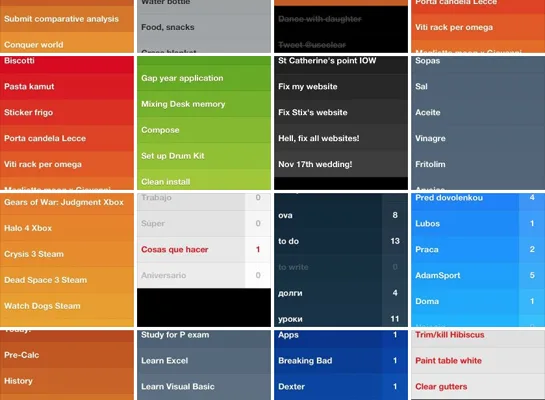
Last week we ran a little competition asking our @UseClear Twitter followers to send in their lists. The response was much greater than we expected with almost 150 screenshots coming our way over 4 days! They’ve been placed into an album over on our Facebook page for you to enjoy.
We were really looking forward to seeing the lists you create using Clear and the entries didn’t disappoint - it’s evident that Clear really is used by everyone, for everything!
To show off the more popular and imaginative uses of Clear, we’ve put together a short list. So in no particular order…
Bucket lists: places to visit, bands to see, books to read, things to do…
Shopping: no surprise here, it’s beautifully simplistic!
Jobs: anything you gotta get done - put it in a list
Homework: students really find Clear a fun and invaluable tool to keep on top of their studies
Work: if a job needs to be done, stick it in a list. Simple
Song Lyrics: just for fun - some of these (like this one) made us laugh

Inspiration: write a few quotes and view first thing in the morning. Great way to start your day
Music: songs, albums & artists. Hear it on the radio, read a review & save to buy later in iTunes
Recipes: step by step instructions you can swipe off as you go
The winner randomly selected was Rune Stølen who posted his list of Movies to watch. A Realmac limited edition t-shirt is working its way to Norway as we speak.
We also created Clear inspired iPhone wallpapers for everyone to say thanks, you can download them here:
Download Clear Wallpaper for iPhone 5
Download Clear Wallpaper for iPhone 4/4S
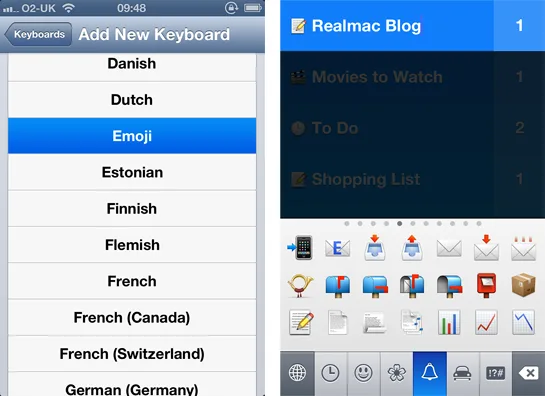
Lastly we saw a few people have added symbols to their lists, we thought we would share how to do this if you were wondering how…
First you need to activate the Emoji Keyboard. To do this:
- Open Settings
- Select General
- Select Keyboard
- Select Keyboards
- Select Add New Keyboard
- Scroll through and select Emoji
Once the second keyboard is set up you can access the emoticons by clicking on the globe icon on the bottom line of your keyboard.
If you’ve not yet downloaded Clear, for a limited time it is only $0.99 exclusively on the App Store - Download it now!
If you missed the competition and still want to send in your lists, we’d love to see them - especially if you make slightly more unusual lists! Simply Tweet them to @UseClear