How to Produce an App Promo Video.
· Rob
In a recent blog post, Dan talked about promo videos as a great way to build hype for your new app. Between the Clear for iPhone and Clear for Mac promo videos, we’ve had over 1.3 million plays - and lots of people have asked how we produced them, so I thought I would share the details on what it takes to produce a video.
Remember: once your app is live on the App Store the majority of users will only ever see the copy and screenshots you prepare for the App Store. As a result, the video is more than just a teaser - it's an opportunity to show off the things that a screenshot cannot.
1. Hire A Director
It’s entirely possible to create a great video in-house on a shoestring budget, however it’s worth considering the amount of time a video can take away from app development, and that the quality of the production which will be directly associated with the quality of your app. Other factors to consider are the expense of hiring camera equipment and lighting, post production and the knowledge of how to get the best use of all this kit.
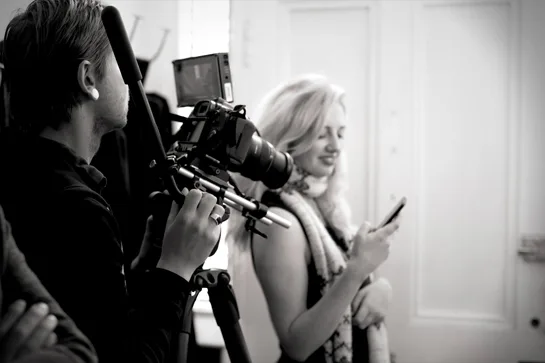
For both Clear videos we used Mike Prior, a London based Director and Editor from NTSH. In total it cost around £2,500 (including equipment) to hire Mike to film and edit.
If you’re stuck for contacts to help produce a video, you might want to check out Startup Videos - if a particular video catches your eye it might be worth contacting the startup directly to find out who produced the video.
2. Storyboard
Before you start storyboarding, you should definitely spend some time prioritising what you want to show off. You don’t want the video to be too long, and we aim for our videos to be around the 60 second mark. Start by drawing out a scene by scene sketch of how things will look on screen, with a detailed synopsis of what’s going on beneath - the more detail the better. We also found it useful to roughly set up each scene at Realmac HQ and take photos so we could begin to visualise how it may look. Your storyboard is the foundation of your video, so make sure you spend time getting this part right.
Get the entire app team together and go through every step of the storyboard - rewriting it into a step by step text document of what’s happening. We spent a few hours going through this, making sure every item on the iPhone/Mac Clear lists matched in each scene, questioning why certain actions were chosen, modifying and making sure we were completely happy. Be aware that at the end of this process, your promo video may have changed quite a bit from the storyboard version!
3. Casting and Location
It’s important to illustrate your app being used in an environment people can relate to. To find a great location, and cast the right person we worked with a couple of local location and casting agencies - the final cost for the location and actor was around £1,500. If you’re hiring an actor/model always make sure that whoever you cast is familiar with the the hardware and app they will be showing!
With the Clear for iPhone video we actually used a member of the Realmac team - Nik - and were lucky to find a café that were happy for us to shoot for free! It goes without saying, but make sure you have the correct insurance and permission whenever shooting in a public location.
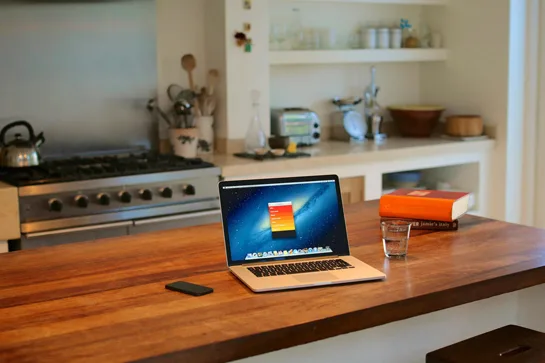
Once you have the perfect location, make sure you send pictures to the producer so they can figure out lighting and photography details.
4. Filming
Your producer will have had plenty of time to familiarise themselves with the storyboard and location so this should now be the fun part.
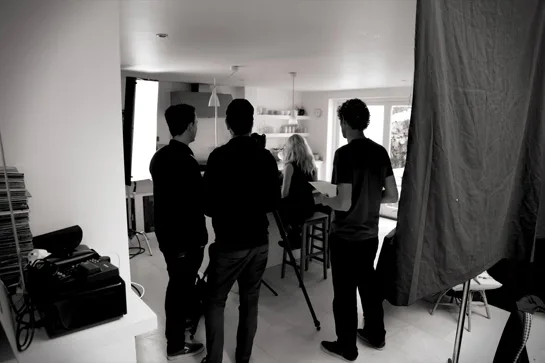
You will need to set up all the props you’ve chosen and talk though the setup of each scene with the director. The director will be responsible for the final look of each shot, so allow time for dressing the set and making small set changes so that the video looks great. You’ll also have to make sure that there’s continuity throughout the entire shoot - not just on set but in the app too! For the Clear for iPhone video, we actually used a special build of the app that would restore to a pre-determined list of tasks when you shook the device.
Make sure you get multiple takes of each scene, so you have plenty of footage to piece together in post-production, and take photos of the scenes too - this may come in useful at a later date.
5. Post-Production
Post-production will generally take around a week. The producer (and video editor) will edit and cut the scenes, making sure the story flows and is cut to time (in our case, 60 seconds). They will make sure that everything looks crisp on screen which may involve comping screenshots of your app onto the footage. Make sure that the final scene contains all the key info you want to get across to the potential user - app icon, name, and release date.
Finding the right soundtrack for your video is really important too - without a soundtrack the results can seem flat and charmless. We worked with Josh Mobley to create a custom track for the video - he also produced the in-app sounds so already had a great appreciation of what we were trying to achieve. There’s obviously some expense involved in custom soundtrack, but we think the extra character it adds to a video is worth it!
Once you’ve got a rough-cut of the video back from the producer, it’s time to get some honest feedback from friends and colleagues who can catch any little things that don’t work.
That’s A Wrap!
All that’s left to do now is to let everybody know about your app. First you need to choose which service to host your video. We’re huge fans of Vimeo, it’s a great service and we host all our videos with them. YouTube is of course an option: it has a larger audience so the opportunity for more people to stumble across your video is greater, however we feel it's just not as nice a place watch videos. Make sure you put in some great copy promoting your app, with links to your website and all the keyword tags that will help your video get found in search.
As Dan detailed in his post, the next step is to launch the teaser site containing the video, and get to work promoting it on your blog and all your social accounts. Be sure to also contact members of the press too!
Your promo video should be a key part of your app launch plan and can really have a massive impact on the success of your app. These steps have worked really well for our videos so far, however you may have some tips to share to and we’d love to hear them - just leave a comment below or let me know on Twitter!